Essay AI Video Models
AI Video Model Cost per Clip Breakdown for Ad Teams
Five hidden costs lurk behind every AI-generated ad's sticker price.
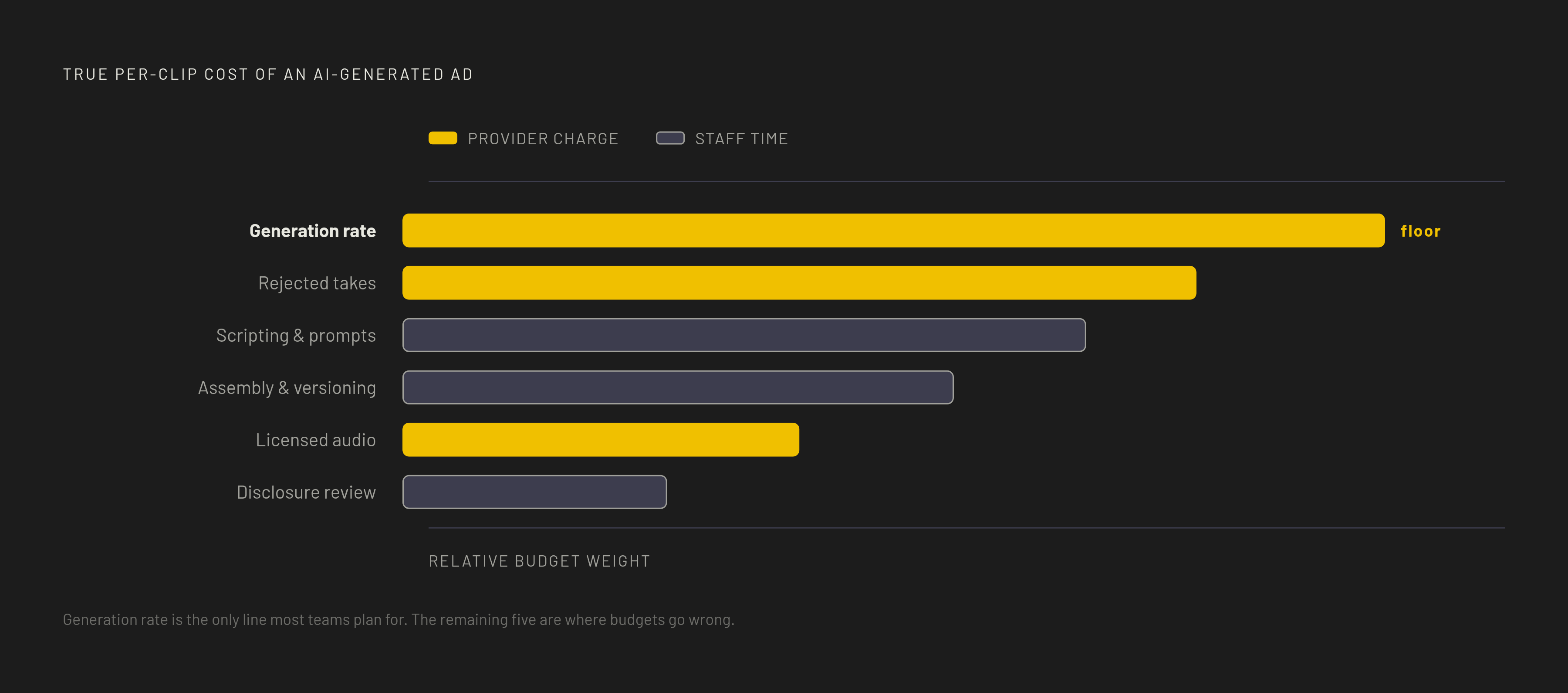
AI video cost per clip is the cost of a finished ad. For ad teams, an accurate budget has six lines, including rejected takes, human labor, audio, and review. The published generation rate is only the starting point. Counting the other five reveals both where budgets go wrong and where production costs can fall.
Why the sticker rate is only one of six cost lines
The most common planning mistake is reading the pricing page and stopping there. That page prices generation. It does not account for the work needed to turn generated footage into an ad that is ready to run. The missing spend is routine.
A complete per-clip budget includes six distinct lines, which are generation, rejected takes, scripting and prompt engineering, assembly and versioning, licensed audio, and disclosure review. Some appear as charges from a provider, while others consume staff time. Untracked labor is still a production cost. At volume, leaving it out creates a widening gap between the budget approved for a campaign and the resources needed to finish it.
Line one: the generation rate and what it actually means per clip
The generation rate establishes the floor for the budget. An 8-second social clip can cost well under a dollar at the cheapest usable tier or several dollars at the top tier. A 30-second product ad spans a similarly wide range depending on the model and tier. Within a single model family, tier selection alone can change per-clip cost by an order of magnitude.
The rate also depends on which provider the team uses. Most hosted subscription platforms wrap generation in a credit pack with a markup and an expiry, while API-direct access pays the list price. A credit allowance therefore needs translating into the amount of footage it buys before it can be compared with a direct rate.
The useful starting number is the cost of generating the required duration at the chosen tier through the chosen provider. Even then, it describes the cost of an attempt, with acceptance still uncertain. That distinction leads to the largest multiplier in the budget, because the model charges for footage whether or not the team can use it.
Line two: rejected takes and how retry cost multiplies the base rate
A team generates a 10-second clip, but the lighting is wrong. It regenerates, and the character’s outfit drifts. The team tries again, then again, until the fifth take finally works. Every miss costs the same as a hit. Five paid attempts have now gone into one usable clip, before anyone counts the time spent reviewing and revising them.
These failures usually originate upstream of the generation call. When the prompt is the only specification, a model with limited reference inputs must interpret unresolved choices about composition, lighting, and character appearance. Rewriting the prompt after each failure makes expensive video generation do the work of visual planning. That is a costly way to settle what a shot should look like.
The fix is to resolve that ambiguity first. Cheap static frames can anchor the composition, lighting, and character before the video model consumes full per-second credits. Storyboard-first production shifts the visual decisions into a less expensive step, making first- or second-attempt acceptance more attainable than a fifth-attempt rescue.
This approach can save even more on a 10-shot storyboard that needs three takes per shot. At the top tier, repeated full-price attempts add up quickly. Retry cost is largely a consequence of how much of the shot remains undecided when generation begins.
Line three: scripting and prompt engineering as billable labor
Script and prompt development belong in the per-clip budget even when no separate invoice arrives. The gap between an AI-assisted scripting step and a manual one can become substantial across a high-volume campaign. Teams without a URL-to-ad pipeline have to keep spending time on prompt engineering. Each failed take can mean another round of changes.
That means a rejected generation can hit two budget lines. It consumes model credits and the human time needed to change the direction. Counting only the first charge hides part of the retry bill, especially when a team repeatedly writes similar instructions from scratch.
A system that keeps successful prompts, brand parameters, and shot preferences gives the team something to build on for the next production, saving it from starting with a blank prompt. The savings extend beyond faster writing. Retained direction also helps reduce the ambiguity that caused expensive retries in the first place.
Line four: assembly, versioning, and the stitching work that follows generation
Variant testing is the right strategy, but it creates real assembly work. Teams that once produced three ad concepts per campaign can now produce many variants per concept, testing hooks, formats, presenters, and calls to action.
Stitching with self-hosted ffmpeg can add almost nothing to the cost of each clip. Human coordination is a different expense. Someone still has to keep track of takes, selects, and version labels, and the more clips there are, the more work that takes. A campaign with cheap individual generations can therefore have a substantial post-generation bill.
Using more than one model adds to the cost of keeping the work in order because drafts and final selects may come from different sources. Those clips need reconciling during assembly, a task that a single-model pipeline avoids while often spending more on generation. Logging each generation by model, cost, time, and prompt version turns assembly records into evidence for future routing decisions, rather than leaving the team dependent on published benchmarks.
Some appear as charges from a provider, while others consume staff time.
Line five: licensed music, voice, and audio that is not native to the video model
Audio is a procurement decision disguised as a post-production detail. Most finished ad deliverables need licensed music, voice, or other sound, yet a video generation price may exclude them. When a model lacks the audio the team needs, sound becomes a separate cost that the team has to keep paying. The video can cost less even as the finished ad costs more.
An audio-native model changes that calculation by including sound generation in the same call. Veo 3.1 and Veo 3 include native audio in the generation cost, making them relevant options when a shot needs synchronized sound. That capability changes what the team must buy or produce afterward.
The practical comparison is whether the chosen model supplies the sound the deliverable needs or leaves a separate licensed component to procure. That question belongs at model selection, before the team commits to a rate that covers only part of the finished clip.
Line six: disclosure review as a non-optional compliance cost
Disclosure review is often budgeted as zero, even though confirming compliance takes human time. As platform AI-content policies and new regulatory frameworks spell out more rules, that work needs a place in each production cycle. The cost varies with the number of platforms, the complexity of their labeling requirements, and whether the team has a documented review process. A clip that fails review may never run. A repeatable checklist spreads the work across clips, while a team that recreates the process spends fresh attention each time.
What the six lines add up to across different production shapes
There is no single honest total for every finished AI ad clip. The generation floor alone ranges from well under a dollar to several dollars for an 8-second social clip, and the remaining costs depend on the production shape. A simple job with few retries, native audio that fits, and little assembly stays closer to that floor. Separate audio, repeated takes, and manual versioning widen the gap. The same underlying footage requirement can end up costing several times more under an inefficient workflow.
For a cinematic product clip made from a photo with an audio-native model, generation can remain the dominant line. Appropriate selection of Veo 3.1 or Kling 3.0 can keep retry and separate audio costs low, while assembly is minimal for a single clip. The budget is concentrated in obtaining the right shot. It still includes scripting and review, but it does not have the coordination load of a large variant campaign.
A high-variant performance campaign has a different cost profile. Generation per clip may be low, while assembly, versioning, and disclosure review multiply across hooks, formats, and presenters. Here, a cheaper generation rate may leave most of the production burden untouched. Workflow memory and metadata logging have more scope to reduce repeat work.
A planning range needs to reflect the actual production shape. The lower end assumes that early takes work, the model has the audio needed, and there is little assembly, while the upper end leaves room for retries and more work by hand. Where scripting or review serves several clips, its cost belongs across those deliverables.
How multi-model routing reduces total per-clip cost without sacrificing output quality
The most direct cost-control strategy is to select models by shot. Expensive capacity belongs where its specific capabilities change the output. Cheaper options can handle the rest. This avoids paying a premium rate for work that does not benefit from it.
In practice, that means using a cheap image model for storyboards and reference frames, then a mid-tier video model for drafts and iteration. Premium generation is kept for hero shots that need native audio coherence, cinematic fidelity, or long-beat holds. A draft and a final hero shot have different requirements.
For motion from a still, Kling on kie is a low-rate option, while Wan 2.6 Flash on AtlasCloud provides a budget route for volume. Shots requiring synchronized audio can go to Veo 3.1 or Veo 3. Final selected shots can then be rendered at the pro tier of whichever model won the test.
The team still needs to check the savings across all six lines. Routing works best when the cost of coordinating sources is smaller than the generation and retry savings it creates. The aim is not the cheapest model for every shot, but the lowest total cost for the required finished output.
How adaptive workflow memory compresses per-clip cost over time
A workflow that keeps successful prompts, character references, brand parameters, and routing decisions can build on them when the next similar job comes along. That gives cost planning a longer horizon. Cost planning needs to track how per-clip cost develops across a campaign or quarter.
Retries are the first major opportunity for improvement. A storyboard prompt and character reference that worked before save the team from making the same choices again. When the prior model choice is retained too, the next similar shot starts with less uncertainty about both direction and execution.
Brand memory also cuts the work of writing scripts and prompts by keeping visual styles, color palettes, and design elements for use across projects. Production metadata complements that creative memory with the record of what each model actually cost and produced. Together, they let the team base routing decisions on its own clips instead of comparisons that have no link to its work. Past production becomes an input to the next budget.
Teams that budget all six lines and retain what succeeds can improve their cost curve over time. Teams that plan only the generation rate leave the largest sources of repeat expense outside the plan.